

Antares AutoTune 2026
Antares AutoTune 2026: Pro vocals in seconds. You shouldn’t have to choose between quality and efficiency. AutoTune 2026 gives you the authentic AutoTune sound in an intuitive, CPU-friendly package. Rebuilt from scratch so you can stay in the flow.
Electronic Delivery
PLEASE NOTE: This product is delivered via secure, electronic delivery. You will receive the full product license (with instructions) direct to your email. Enjoy a safe and fast way to get the latest version and full support direct from the manufacturer.
Description
More power. less CPU. Under-the-hood optimizations make AutoTune 2026 more performant than ever whether you’re tracking, mixing, or live tuning.
- Up to 2.3x faster CPU performance at 192kHz
- Up to 35% more efficient at 48kHz
- Up to 2x more instances per project
The Original AutoTune Reborn
Our legendary pitch correction algorithm, reengineered for speed. AutoTune 2026 gives you best-in-class sound while optimizing performance and workflow so you can get the pro vocals you want without slowing down.
Instantly switch between Low Latency for live use or HQ (High Quality) for mix-ready fidelity. Seamless real-time processing keeps pace with your inspiration no matter what.
Visualize Your Tuning
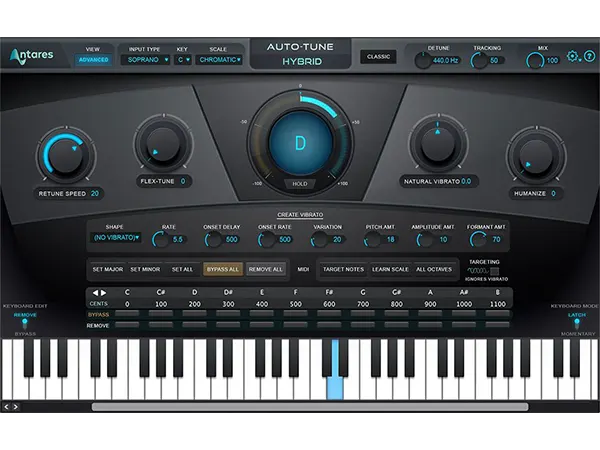
Control essential AutoTune functions like Humanize for less robotic correction and Flex Tune for increased expression. An all new visual feedback indicator shows exactly how your vocals will be affected, eliminating any guesswork.
Choose Classic Mode to emulate the old-school flavor of AutoTune 5, delivering the iconic AutoTune effect that’s dominated popular music for decades. Need something more subtle? Modern Mode unlocks Flex Tune and HQ mode for more control over your vocals.
Simple Setup Personalized Tuning
AutoTune 2026 adapts to give your voice the treatment it deserves. Select your Vocal Range or let the plugin set it for you. Then set your Key & Scale and you’re good to go.
The redesigned Edit Notes feature makes scale customization easier than ever. Click on a note to add or omit it within the chosen scale, giving you complete command over which pitches are targeted.
Features
- Best in class AutoTune Pitch Correction
- Ultra Low CPU Usage
- Low Latency Processing
- Visual Pitch Display
- Humanize and Flex Tune
- AutoKey 2 Compatibility
Tech Specs
macOS 13 Ventura And Superior
Plugin Formats: VST3 (64-bit), AU (Audio Units), AAX Native (64-bit).
Audio Requirements: Sample rates: 44.1kHz to 192kHz. Bit depth: 16/24/32-bit float. Mono/Stereo support.
DAWs: Ableton Live (AU, VST3), Cubase (VST3), FL Studio (VST3), GarageBand (AU), Logic Pro X (AU), Nuendo (VST3), Pro Tools (AAX), Reason (AU, VST3), Studio One (AU, VST3).
Windows 10 And 11
Plugin Formats: VST3 (64-bit), AAX Native (64-bit).
Audio Requirements: Sample rates: 44.1kHz to 192kHz. Bit depth: 16/24/32-bit float. Mono/Stereo support.
DAWs: Ableton Live (VST3), Cubase (VST3), FL Studio (VST3), Nuendo (VST3), Pro Tools (AAX), Reason (VST3), Studio One (VST3).
* Any references to any brands on this site/page including reference to brands and instruments, are provided for description purposes only. For example references to instrument brands are provided to describe the sound of the instrument and/or the instrument used in the sample. Plugin Max do not have (nor do they claim) any association with or endorsement by these brands. Any goodwill attached to those brands rest with the brand owner. Plugin Max or its suppliers do not accept any liability in relation to the content of the product or the accuracy of the description.

Reviews
There are no reviews yet.