
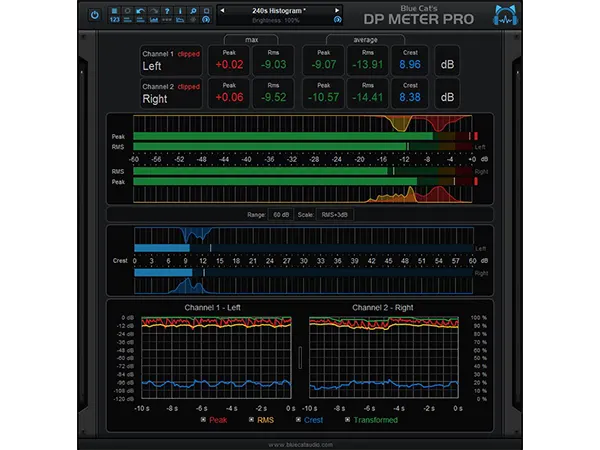
Blue Cat’s DP Meter Pro
Blue Cat’s DP Meter Pro: Audio meter & side chaining tool. Unique audio meter and side chaining tool.
Electronic Delivery
PLEASE NOTE: This product is delivered via secure, electronic delivery. You will receive the full product license (with instructions) direct to your email. Enjoy a safe and fast way to get the latest version and full support direct from the manufacturer.
Description
Blue Cat’s DP Meter Pro (DPMP) is an audio analysis tool that combines flexible meters with side-chaining capabilities through MIDI and automation outputs. Its metering features, including peak, RMS, and crest factor meters, are highly customizable. The plug-in offers five default scales, including Bob Katz’s K-System scales, and allows you to create your own. It includes large colored displays for an overview and histograms for precise dynamic range measurements. Graphs show the evolution of audio envelopes, and a mid-side switch helps check for mono compatibility and stereo imaging. The DPMP works with mono, stereo, or surround tracks. The generated envelopes (peak, RMS, etc.) can be modified and used to control other effects in real-time via automation curves or MIDI CC messages.
Blue Cat Audio Standards
- Available in most plug-in formats for Mac and Windows.
- Full MIDI control and automation support, MIDI Learn.
- No CPU load on idle: processing shuts down when fed with silence (optimal CPU usage).
- Customizable user interface with transparency & zoom.
- Automation and MIDI output: record output parameters as automation curves or send MIDI CC messages to other plug-ins for powerful side chain effects.
- Smooth Bypass: noiseless plug-in activation / deactivation.
- Undo/Redo.
- Full featured integrated presets manager.
- Copy/paste the state of the plug-in between instances.
- Any sample rate supported.
New
- Fixed layout issue with some controls introduced in previous update
- Added Apple Silicon support for AAX Plug-in Format.
- Fixed VST3 version not always loading properly in Ableton Live 11.
- Improved VST parameter value display in some host applications.
- Added an option in global & preset input settings to send MIDI events when MIDI-enabled parameters are modified in the plug-in (to update control surfaces accordingly).
- Improved undo management and automation when using the mouse wheel to move knobs.
- Fixed VST & VST3 automation not recording properly in some hosts for output parameters (Cubase 11, Ableton Live).
- AAX: Fixed erratic mouse behavior in Pro Tools on Mac.
- Mac: installers and plug-ins have been notarized to avoid security warnings on Mac OS Catalina and newer.
Features
- Multichannel peak, RMS & crest factor meter.
- True dynamic range measurement with levels histograms.
- Instant, average and maximum audio levels.
- Modular user interface to fit into your workflow, with multiple screen sizes.
- Total control over the metering characteristics, including attack/release shape.
- Bob Katz’s K-System scales support (K-12 / K-14 / K-20 and custom)
- Mono, stereo, mid-side or surround analysis.
- Record measurements (peak, RMS, crest factor, clip etc.) as automation curves.
- Control in real time any MIDI-compatible plug-in or external MIDI device with the generated envelopes thanks to the plugin’s MIDI CC output. See the Tutorials section for more examples.
- Manage the shape of the output envelope: record reversed envelope, change amount of signal, and offset the generated envelope. This lets you use the plug-in for side chain ducking, compression and much more.
- Easy ‘stereoness’ and phase cancelation measurement.
Tech Specs
MAC
Mac OS 10.9 or newer.
CPU: An Intel or Apple Silicon processor.
Plugins: VST-2, VST-3, AU, AAX
WINDOWS
Windows Vista, Windows 7, 8 or 10.
CPU: An SSE2-enabled processor (Pentium 4 or newer).
Plugins: VST-2, VST-3, AAX
* Any references to any brands on this site/page including reference to brands and instruments, are provided for description purposes only. For example references to instrument brands are provided to describe the sound of the instrument and/or the instrument used in the sample. Plugin Max do not have (nor do they claim) any association with or endorsement by these brands. Any goodwill attached to those brands rest with the brand owner. Plugin Max or its suppliers do not accept any liability in relation to the content of the product or the accuracy of the description.
Reviews
There are no reviews yet.