
Boom Library Soundweaver
Boom Library Soundweaver: Application that automates sound design. Audio layering wizard.
Electronic Delivery
PLEASE NOTE: This product is delivered via secure, electronic delivery. You will receive the full product license (with instructions) direct to your email. Enjoy a safe and fast way to get the latest version and full support direct from the manufacturer.
Description
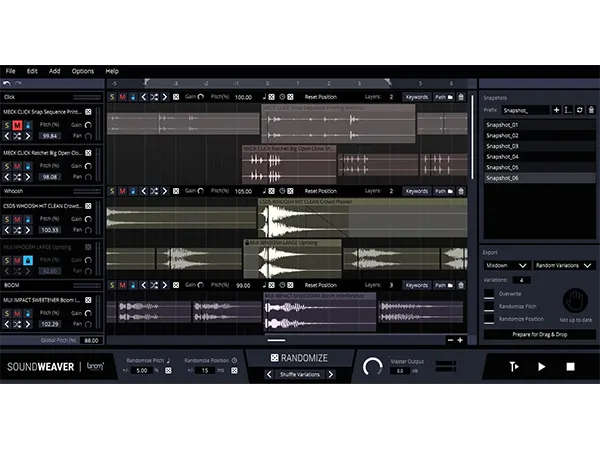
Soundweaver is a standalone application designed to streamline the sound design workflow by helping users create new sounds from their existing library. It enables a highly inspirational process, exploring the full potential of a sound library and speeding up asset creation.
Create More – Skip The Busywork
This application provides unlimited sound design power, allowing users to easily add complexity and texture by blending different sound layers. It can magically morph and layer any sound from a user’s library into a new one, producing massive rumbles, organic thuds, futuristic effects, and more.
Produce More Assets
Using powerful randomization features powered by keywords, Soundweaver helps produce assets quickly and efficiently. It automatically marks variations, allowing users to easily lock accepted assets while the app suggests new layers for further customization.
Ready-To-Use Sound Sessions
Users can create custom sound design sessions with ready-to-use combinations. Snapshots allow saving preferred edits, making it easy to compare them with new experiments.
Generate Variations With Ease
When used with BOOM Library sounds, SOUNDWEAVER reads and displays the variations included in a single file as individual files, enabling easy switching between them.
True Drag And Drop
Soundweaver is designed to work alongside a DAW or video editor. Users can effortlessly drag and drop audio assets into the app. When finished, a single click on “Prepare for Drag & Drop” allows the newly prepared asset to be dragged directly into the project.
What Does Soundweaver Do?
Soundweaver automates and randomizes parts of the sound design workflow. It searches a sound library using keywords or folder paths, selecting matching sounds for a project. The application automatically sorts, groups, layers, and aligns sounds, even splitting files with multiple variations into regions. Users can then pitch, offset, gain, shuffle, and randomize individual sounds, groups, or the entire project. Snapshots can be taken of favorite combinations, and the final mix can be exported or dragged into a DAW. It can also generate countless variations during export via pitch, offset, and take randomization.
More Variety On Tight Schedules
The app automates time-consuming steps like pitching, shifting, and switching elements, generating numerous suggestions for sound assets and variations. This allows users to focus on the creative process, as Soundweaver handles the meticulous work, generating as many options as needed.
Inspiration Through New Combinations
Soundweaver’s powerful Randomize feature generates combinations that users might not have thought of, opening up new creative possibilities. It can build upon existing ideas or set up a session from scratch, making it a great tool for starting a project or finding that “special something” with just a few clicks.
Features
- Automatically picks, slices, aligns, and layers sounds.
- Searches by keywords, folders, or drag-and-drop.
- Allows pitching, offsetting, gaining, shuffling, and switching out sounds.
- Supports VST-Plug-ins for tracks, groups, or master output.
- All parameters can be randomized.
- Enables exporting by dragging the project into a DAW.
- Can export as individual layers, groups, or a mixdown.
- Generates variations during export using pitch, offset, or random takes.
- Allows users to take snapshots and return to their favorite settings.
Tech Specs
MAC
OS X 10.9 (Intel Core i5)
Memory: 8 GB
Plugins: STAND-ALONE
WINDOWS
Windows 7 (Intel Core i5)
Memory: 8 GB
Plugins: STAND-ALONE
* Any references to any brands on this site/page including reference to brands and instruments, are provided for description purposes only. For example references to instrument brands are provided to describe the sound of the instrument and/or the instrument used in the sample. Plugin Max do not have (nor do they claim) any association with or endorsement by these brands. Any goodwill attached to those brands rest with the brand owner. Plugin Max or its suppliers do not accept any liability in relation to the content of the product or the accuracy of the description.
Reviews
There are no reviews yet.