
Fiedler Audio Mastering Console 2
Fiedler Audio Mastering Console 2: The one-stop Dolby Atmos Mastering solution. Complete workflow in one app. Approved by Dolby Labs.
Electronic Delivery
PLEASE NOTE: This product is delivered via secure, electronic delivery. You will receive the full product license (with instructions) direct to your email. Enjoy a safe and fast way to get the latest version and full support direct from the manufacturer.
Description
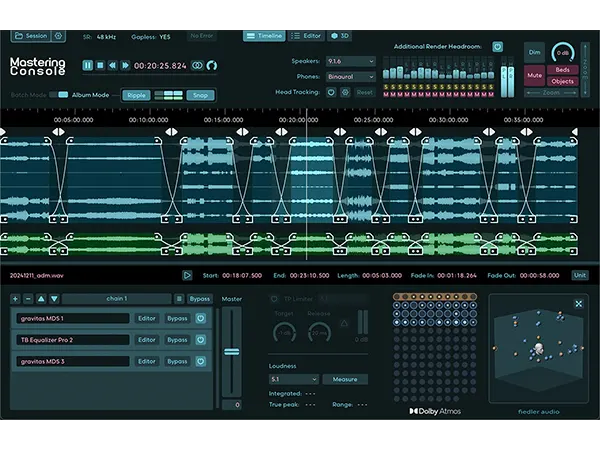
Do you want to master your ADM/BWF files, just like you know it from mastering stereo mixes for decades? The Mastering Console is the one stop Dolby Atmos mastering solution with OBAM plug-in hosting for conveniently processing your entire Dolby Atmos mixes to give them the final shine. Create albums with crossfades, sophisticated loudness measurements and the fastest workflow on the market.
Process multiple ADM/BWF files and their stereo counterparts as a batch. Or create an album with seemless transitions using our innovative crossfade feature for Dolby Atmos mixes.
Master Channel, True Peak Limiter
Master your Dolby Atmos mixes through OBAM plug-ins in the Master Channel with the same ease as you would master a stereo track. Use your entire VST3 plug-in arsenal on your stereo tracks.
Measure loudness, automatically adjust LKFS value and engage the unique True Peak Limiter for making sure the master stays within the loudness norms.
Monitor on speakers and headphones simultaneously. Use Dolby’s own binaural algorithm or Apple Spatial Audio, even on Windows. Combine with various headtracking options.
Free Routing And Room Tuning
Create the routing you need for your studio to conveniently listen on speakers and headphones at the same time without the need to rewire your setup. Tune each of your speakers using volume, delay and EQ.
Check your beds and dynamic objects in the comprehensive 3D view. Focus on certain elements by hiding others to see what happens where and when.
The Mastering Console is fully approved by Dolby Labs. It gives you access to all the settings for professional Dolby Atmos mastering plus features you won’t find in any other Atmos mastering solution.
Features
- Dolby Atmos mastering – approved by Dolby Labs
- Master Dolby Atmos and Stereo mixes together
- Support for 48 kHz and 96 kHz workflows
- Work on them as a batch or create gapless albums with seemless transitions on the timeline using crossfades
- Process your Dolby Atmos mixes through OBAM plug-ins and use your entire VST3 plug-in arsenal for the stereo mixes
- Automated loudness measurement and LKFS adjustment
- Ultra transparent True Peak limiter for loudness compliance
- Supports monitoring on: stereo, binaural, 5.1, 5.1.2, 5.1.4, 7.1, 7.1.2, 7.1.4, 9.1.4, 9.1.6 and Apple Spatial Audio (on Windows without headtracking)
- Various head tracking options
- 3D View for visualization of beds and dynamic objects
- Edit Binaural Mode, Description and Group of each Atmos channel
- Change channel order or deactivate unwanted channels
- Automatic detection and removal of silent channels
- Edit Downmix, Trim and Balance for full control over how your mix sounds on different reproduction systems
- Simultaneous high speed export of ADM/BWF, Multichannel Rerenders, Binaural, Apple Spatial Audio and/or Stereo Reference
- Sophisticated routing system for ultimate monitoring flexibility in your studio, can be saved as presets
- Comprehensive speaker calibration parameters (volume, delay & EQ) for each speaker channel, can be saved as presets
- Batch downsampling of ADM/BWF files from 96kHz to 48kHz
Tech Specs
MAC
OS X macOS 11 – 15
Memory: 4 GB
Disk: 1 GB
CPU: min. 2 GHz, x64 with at least SSE3 support or Apple Silicon
Plugins: RTAS
WINDOWS
Windows Windows 10 & 11
Memory: 4 GB
Disk: 1 GB
CPU: min. 2 GHz, x64 with at least SSE3 support
Plugins: STAND-ALONE
* Any references to any brands on this site/page including reference to brands and instruments, are provided for description purposes only. For example references to instrument brands are provided to describe the sound of the instrument and/or the instrument used in the sample. Plugin Max do not have (nor do they claim) any association with or endorsement by these brands. Any goodwill attached to those brands rest with the brand owner. Plugin Max or its suppliers do not accept any liability in relation to the content of the product or the accuracy of the description.
Reviews
There are no reviews yet.