
Sonoris DDP Creator Pro
Sonoris DDP Creator Pro: Standalone cross-platform DDP authoring application.
Electronic Delivery
PLEASE NOTE: This product is delivered via secure, electronic delivery. You will receive the full product license (with instructions) direct to your email. Enjoy a safe and fast way to get the latest version and full support direct from the manufacturer.
Description
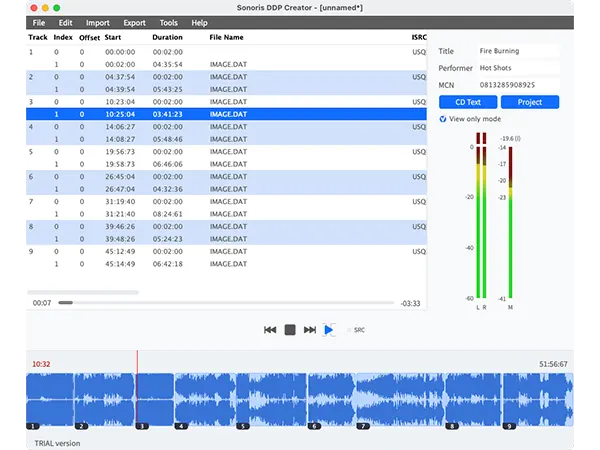
The Sonoris DDP Creator is a standalone cross-platform DDP authoring application compatible with virtually any DAW software on the market. The DDP Creator lets you assemble professional RedBook compatible audio CD’s and supports the import and export of DDP 2.00 images and Cue Sheet (cue) files. It also enables you to burn and rip audio CD’s and send off images with FTP.
CD Authoring
With the DDP Creator you can assemble a RedBook compatible CD by just dropping mastered 16 bit wav or aif files on the workspace and set the track order. After that you can adjust the spaces between tracks and audition this by playing back the transition from one track into another. Then edit the PQ points, ISRC, MCN and CD-Text data. Finally export to DDP, Cue Sheet or CD and print a PQ sheet if needed.
Enhanced CD
The Pro option allows even more control and adds Enhanced CD support to the DDP Creator. You can create Enhanced CD DDP filesets from within the program by adding an ISO file to an audio project. This can be an (Hybrid) ISO file made with for example Toast or an ISO file made with the DDP Creator by converting a folder holding the data files.
DDP Export
With the DDP Creator you can assemble a RedBook compatible CD by just dropping mastered 16 bit wav or aif files on the workspace and set the track order. After that you can adjust the spaces between tracks and audition this by playing back the transition from one track into another. Then edit the PQ points, ISRC, MCN and CD-Text data. Finally export to DDP, Cue Sheet or CD and print a PQ sheet if needed.
DDP Import
Besides DDP export the DDP Creator can import (loadback) a DDP fileset too, including DDP images made by other software, like Bias Peak Studio (XT), Sonic Studio HD, SADiE, Sequoia or Pyramix. This feature allows you to check the project including all PQ codes, ISRC, MCN and CD-Text data. You can edit the project, playback tracks and export to DDP, Cue Sheet or burn a Redbook compatible CD from it.
Compatibility
Most DDP software packages or add-ons are very expensive, but the DDP Creator is competitively priced. Together with the powerful import features it is the perfect choice for everyone who needs a professional CD authoring and DDP solution without the need to switch to another DAW software. For example, you have assembled a CD in your favorite audio editor but need to deliver a DDP fileset? Simply add audio files or use one of the powerful import features like .cue Cue Sheet files from Wavelab, CD Architect .wav image files or Pyramix .pmi files or rip a CD and then export the project to DDP.
Features
- Supports import and export of .wav, aif, .flac and .m3u files
- MP3 and AAC encoding, up to 320 kbps
- 24 and 32 bit file support
- Sample rates from 44.1 KHz to 96 KHz supported
- High quality sample rate conversion (with Secret Rabbit Code)
- Add and edit ISRC, MCN and CD Text per track and/or for the entire project
- Add and edit track indices, including on the fly during playback
- Playback of individual tracks or entire project
- Adjust and playback transitions between tracks with pre-roll
- Export DDP 2.00 image files
- Import DDP 1.0x and 2.00 image files
- Undo and redo
- Pyramix .pmi CD image support
- CD Architect .cda CD image support
- CD Text binary file import and export
- Audio CD burning
- Audio CD import (ripping)
- Data CD/DVD burning
- MD5 checksum files automatically created
- MD5 checking
- MD5 checker executable for Windows and Mac included in DDP image
Tech Specs
MAC
OS X: Mac OSX 10.11 or higher
WINDOWS
Windows: Windows 7 or higher
* Any references to any brands on this site/page including reference to brands and instruments, are provided for description purposes only. For example references to instrument brands are provided to describe the sound of the instrument and/or the instrument used in the sample. Plugin Max do not have (nor do they claim) any association with or endorsement by these brands. Any goodwill attached to those brands rest with the brand owner. Plugin Max or its suppliers do not accept any liability in relation to the content of the product or the accuracy of the description.
Reviews
There are no reviews yet.