
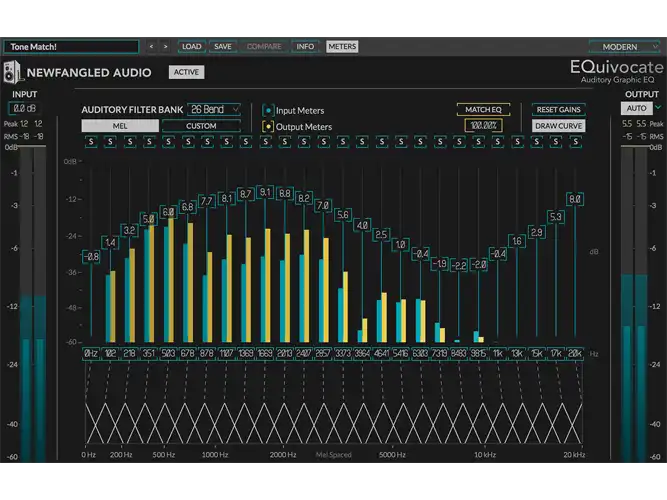
Newfangled Audio EQuivocate
Perfect for mixing and mastering Newfangled Audio EQuivocate auditory filters and match EQ functionality make it incredibly powerful, simple to use, and natural-sounding.
Electronic Delivery
PLEASE NOTE: This product is delivered via secure, electronic delivery. You will receive the full product license (with instructions) direct to your email. Enjoy a safe and fast way to get the latest version and full support direct from the manufacturer.
Description
26 band precision Mel scale EQ with Match EQ function allowing the profiling of an input source. EQuivocate uses filters that are modeled on the human ear. Each of the 26 critical bands tickles a different part of your inner ear, making any combination of settings sound as natural as possible. Combining this with a linear-phase filter shape that reduces pre-echo makes Newfangled Audio EQuivocate an EQ with a difference you can hear.
Use EQuivocate’s Match EQ feature to make the sound of your track match or complement the audio signal streamed to its sidechain. You can also use it to make a final master match the tone of a reference track, or help fit a sound into a dense mix and unlike other match EQ plug-ins, EQuivocate provides a transparent match without trying to model imperceptible differences which can cause a match EQ to sound unnatural. Feed your favorite song or individual track into it and instantly morph your tone to match. The 26 filters are distributed along the Mel Spectrum, but you can customize the filters and their frequencies. When combined with usability options like Automatic Level Compensation, Draw EQ Curve, and individual solos for each critical band, EQuivocate is as powerful as it is precise.
Features
- Simple yet musical, the 26 linear phase auditory filters are shape to approximate the critical band filters in your ear.
- Match EQ feature matches the tone of one track to another. Blend two tracks to sound like they came from the same source, complement each other for better separation, or make a final master have a similar tone to a reference track!
- Click and swipe your mouse across the gain slider field to draw an EQ curve. Then toggle Draw Curve off to fine tune.
- Use the output level Auto button to automatically compensate for level changes introduced by the EQ.
- Solo the output of one or more bands to easily find problem frequencies.
- Add or remove filters to customize your sound.
- Includes artist presets from Richard Devine, Jeremy Lubsey, Alex Saltz, Sebastian Arocha Morton, Richard X, and John McCaig.
- Start with the presets or create your own. Use the Compare button to toggle between two unique settings.
Tech Specs
Mac
OS X macOS 10.9+
Plugins: VST-2, VST-3, AU, AAX
Windows
Windows 8+
Plugins: VST-2, VST-3, AAX

Reviews
There are no reviews yet.