
UVI Drum Replacer
UVI Drum Replacer: Real-time drum replacement utility featuring component separation and VSTi triggering. Effortlessly remove bleed or layer custom samples.
Electronic Delivery
PLEASE NOTE: This product is delivered via secure, electronic delivery. You will receive the full product license (with instructions) direct to your email. Enjoy a safe and fast way to get the latest version and full support direct from the manufacturer.
Description
Drum Replacer is a realtime, program-adaptive, drum replacement and processing utility, providing effortless audio component separation and triggering with a sophisticated feature set and elegant workflow. With Drum Replacer you can easily remove bleed from drum recordings, replace drums in a mix with your favorite samples or VSTi, add sub-bass, layer existing drum sounds, and more.
Utilizing machine learning-based analysis with realtime separation, Drum Replacer will examine and intelligently parse an incoming audio signal into discrete components. Selected elements are then fed into a detection circuit to trigger up to 8 internally-hosted audio samples or virtual instruments simultaneously, sequentially, or randomly. Drum Replacer was design to provide users a sophisticate end result with minimal effort. Analysis, detection and track customization can all be use with only a few clicks, making it easy to master and implement throughout your projects; integrated browsers with favorites combined with comprehensive preset support for all or individual tracks help make the most of your time.
Machine Learning
Drum Replacer works uniquely by using machine learning to create spectral models for each discrete sound it detects during analysis. This allows it to produce very accurate component isolation – with gain and velocity tracking – in realtime, opening up many new avenues for processing in mixing and remixing environments. Analysis can be use at any time to the incoming audio signal by clicking ‘LEARN’, or from any audio file by way of drag-and-drop. Once the system completes the analysis, it splits and orders the components by overall energy level, designating a component as (R).
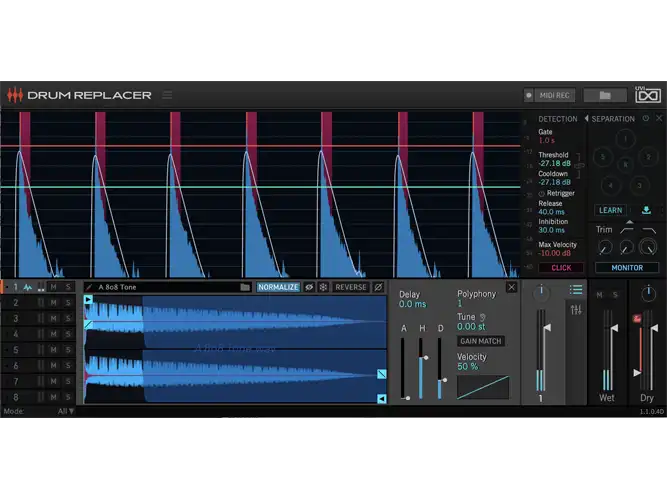
Components will flash within the UI as they’re triggered, making them easy to identify on-the-fly. They can be individually muted, and their sum can be further processed by way of trim, low-pass and high-pass filters, before being sent through to the outputs or into the detection engine. Triggering is managed with the large central analyzer, and control panel immediately to its right. Prior to analysis this display shows the aggregate input signal, but once an analysis has been made it displays only the currently selected components – allowing you to easily focus on and fine-tune triggering to specific elements in a mix.
8 Layers
Configuring detection is straight-forward. Set the Threshold (green line) so that it’s trigger by the initial attack and adjust the Cooldown (blue line) to prevent unnecessary retriggering. Gate duration can manually set in milliseconds and note velocity range by way of Max Velocity (red line). Detection creates a note trigger sent internally to all 8 tracks in Drum Replacer. Initially, changes to detection settings will be inaudible (until you’ve loaded a sample or VSTi), but enabling ‘CLICK’ will output a placeholder sound to help while you dial-in the desired response.
Drum Replacer comes with 8 tracks that can be load with either audio samples or your own virtual instruments. A built-in browser helps you to easily find local sounds and plugins (conveniently organized by maker). For quick access to your preferred samples and plugins, simply toggle the ‘Star’ icon to add them as favorites. Both sample and instrument tracks provide basic mixing controls (level, pan, and lp/hp filter), velocity, and custom track naming. In addition each track has a configurable delay offset that allows you to adjust timing positively or negatively. Making it easy to achieve perfect sync with the audio source or even pre-trigger your sounds and instruments.
Features
- Machine learning-based analysis with realtime component separation and triggering
- Trigger internally-hosted samples and VSTi, with browser, preview, and favorites
- Positive and negative offset allows pre-triggering, gain and pitch matching
Tech Specs
Mac
OS X MacOS 10.14 Mojave to macOS 26 Tahoe
Memory: 4 GB
Disk: 1 GB
Plugins: VST-2, VST-3, AU, AAX
Windows
Windows 10 to Windows 11
Memory: 4 GB
Disk: 1 GB
Plugins: VST-2, VST-3, AAX
Reviews
There are no reviews yet.