
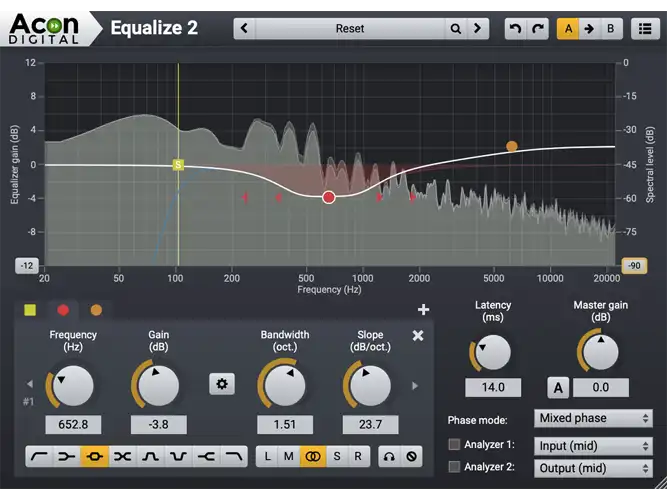
Acon Digital Equalize 2
Acon Digital Equalize 2: Unlock the power of precise sound shaping with Acon Digital Equalize, a parametric equalizer plugin designed to elevate your audio to perfection.
Electronic Delivery
PLEASE NOTE: This product is delivered via secure, electronic delivery. You will receive the full product license (with instructions) direct to your email. Enjoy a safe and fast way to get the latest version and full support direct from the manufacturer.
Description
Acon Digital Equalize 2 is a parametric equalizer plug-in with a unique workflow and intuitive interface. It allows free adjustment of center frequency, gain, bandwidth, and filter slope for each band, with slopes ranging from 3 dB to 120 dB per octave. The plug-in offers a minimum phase mode for zero latency, a linear phase mode that preserves phase relationships, and a unique mixed phase mode with adjustable latency (5 to 120 ms) to control pre-ringing artifacts. The user interface allows direct adjustment of band parameters, and a real-time analyzer monitors the processing. Equalize 2 also enables independent processing for mid, side, left, or right channels for each band.
- Eight different band filter types, including low cut, low shelf, peak, tilt, bandpass, notch, high shelf, and high cut
- Up to twelve independent bands
- Freely adjustable gain, frequency, bandwidth, resonance, and filter slope
- Three phase modes, including the novel mixed phase mode with adjustable latency
- Independent channel mode for each band (mid, side, left, right, or full processing)
New
Version 2 introduces two new filter types: tilt and bandpass, bringing the total to eight. Both new filters offer continuously adjustable slopes from 3 to 120 dB per octave. The equalizer curve’s frequency range can now be altered by dragging the edges of the frequency axis for more precise control. A new preferences page includes settings for analyzer resolution and user interface language. An optional piano keyboard display has been added, allowing users to set band frequencies by clicking keys.
- Two new filter types: tilt and bandpass
- Adjustable frequency range in the equalizer curve editor
- Optional piano keyboard display
- EUCON and full Pro Tools HW controller support
- New preferences page for spectrum analyzer, tooltip, language, and piano roll settings
- Spectrum analyzer with adjustable frequency tilt
Features
- Native 32-bit or 64-bit versions of all plug-ins are available
- Supports sampling rates up to 96 kHz
- Supports multi-channel formats such as 5.1 and 7.1 surround
- Up to twelve equalizer bands
- Eight different band filter types (low cut, low shelf, peak, tilt, bandpass, notch, high shelf, and high cut)
- Band frequency, gain, bandwidth, resonance, and filter slope are freely adjustable for each band
- Three different filter modes: minimum phase, linear phase, or the novel mixed phase
- Adjustable latency and pre-ringing time in mixed phase mode
- Zero latency in minimum phase mode
- Channel mode (mid, side, left, right, or full processing) can be set independently for each band
- Multiple selection of bands
- Resizable graphical user interface
- Solo and bypass modes
- Optional automatic make-up gain
- Optional gain to bandwidth linking
- Two spectrum analyzers that can analyze the input or output signal from the mid, side, left, or right channel
- Graphical visualization of the equalizer frequency response
- Preset manager with a large number of factory presets
- Save, load, and categorize user presets
Tech Specs
Mac
OS X 10.9 or later
Memory: 1 GB
Disk: 1 GB
CPU: Runs natively on ARM64 and Intel
Plugins: VST-2, VST-3, AU, AAX
Windows
Windows 7, 8, 10, 11
Memory: 1 GB
Disk: 1 GB
CPU: Intel Core i3 or AMD multi-core processor (Intel Core i5 or faster recommended)
Plugins: VST-2, VST-3, AAX
Reviews
There are no reviews yet.